


NEW FOR SUMMER 2026: Undergraduate Courses with required digital materials will be deployed through Immediate Access. Not Immediate Access ONE.
What Is Immediate Access?
Immediate Access is a collaborative program between the ISU Book Store, faculty, and publishers. Immediate Access is only available for graduate level courses and summer session courses. Students who are enrolled in a graduate course or summer course access their required digital materials through Immediate Access. Students can start accessing their digital materials by the first day of class and at a reduced cost compared to the national average.
- Instructors: We process required book requests as digital first. So if there is a digital option of a required material that will be used and included in Immediate Access. Print format must be requested at the time of adoption.
*some excusions may apply* - This will not apply to materials like Lab Manuals and Workbooks, which will continue to be offered in physical form.

Easy "Day 1"
Access
This course material is ready and waiting for students in Canvas on the first day of class
Greater
Success
Get increased interaction with course content leading to greater student success
Reduced
Cost
Students automatically receive a reduced price for the course material (charged to U-Bill)

Powered by VitalSource
A leading authority in digital course materials, and student savings

Free Study Tool
with CoachMe
Bookshelf CoachMe is a free, built-in study coach that provides embedded practice throughout the e-text using AI technology
How Does Immediate Access Work?
- When an instructor sends in their course material requests to the ISU Book Store all required material with a digital match will be included in Immediate Access. Instructors can request not to have their required material included in Immediate Access.
- Upon enrollment in the course, Immediate Access course materials will be automatically billed to a student's university account (U-Bill)
- Students will be able to access their Immediate Access digital course material through Canvas on the first day of class
- If a student does not wish to use Immediate Access, they have the ability to opt-out in Canvas. Opting out does not mean they are dropping the course. It simply means they are choosing not to receive the digital content from the bookstore and they must find another way to acquire it. Students have within the first 10 days of classes to opt-out and receive a refund to their U-Bill (5 days for courses 8 weeks or shorter).
- CAUTION: Please speak to your instructor BEFORE opting out. Some Immediate Access materials contain homework platforms that can only be expensive and difficult to setup outside of the Immediate Access program.
- If a student drops a course in allotted add/drop time period, they will be automatically refunded to their U-Bill. See Iowa State Registration Dates to Learn More
- Students will receive an email from Iowa State University Book Store (no-reply@verbasoftware.com) with more information about Immediate Access and what courses are using Immediate Access materials.
- Faculty will receive an email with Immediate Access information from John Wierson
How is Immediate Access different from Immediate Access ONE?
Immediate Access is only for required digital materials and students are charged per item on their U-Bill. Immediate Access is only for graduate-level courses and summer undergrade and graduate courses. Immediate Access ONE is a flat-rate charge that includes required digital and print books. Immediate Access ONE is only for undergraduate courses.
Prices will vary depending on the course materials chosen by your instructor. Most Immediate Access prices are lower than the cost to access the material directly through the publisher and averages a cost savings upwards of 60% off the price of a new print textbook.
You will see a charge on your U-Bill from the bookstore on or before the first day of class. There is nothing tangible to purchase from the ISU Book Store. The billing description on your U-Bill will read, "University Bookstore - Immediate Access Course Materials One (v1)" and the course. Below is an example of the billing description for a student enrolled in ATR 5100 - Evaluation Methods and Treatment Techniques - Lower Body.
Instructors and TAs will not be billed for access to Immediate Access Course Materials. TAs must be listed as a TA or instructor in Canvas.
Students may choose to opt-out of each Immediate Access material. Opting out does not mean you are dropping the course. It simply means you are choosing not to receive the digital content from the ISU Book Store at a reduced rate. Opted out students must find another way to acquire access in order to complete required homework assignments. Students have within the first 10 days of class to opt-out and receive a refund to their U-Bill (5 days for courses 8 weeks or shorter).
1. To opt-out, click on the "Immediate Access" tool on the navigation menu in Canvas.
2. Click on "Want to opt-out?"
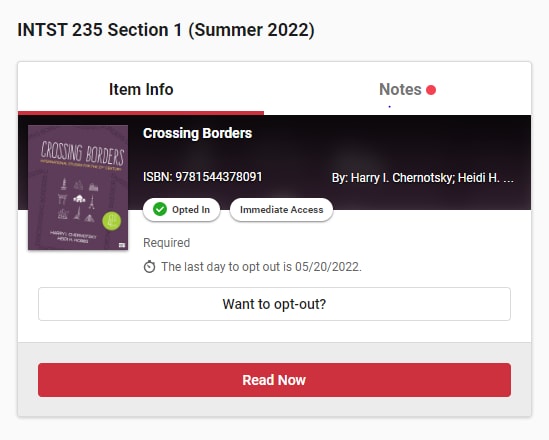
3. After you have opted out you will receive a confirmation email. If you do not recieve a confirmation email within 24 hours after opting out please email immediateaccess@iastate.edu.
No worries! If you are still within in the first 10 days of class, you can click the opt-in button in Canvas and have access to the material again. If you need assistance, send us an email at immediateaccess@iastate.edu.
If you drop your course prior to the 10th day of class (5th day of class for partial semester courses), you will automatically receive a refund for the digital course material. Courses dropped beyond the 10th day of class are not eligible for refunds. You do not have to contact the bookstore if you drop the course. Partial semester courses must be dropped by the 5th business day after the start of the course to receive a refund.
You will receive an email from Iowa State University Book Store (no-reply@verbasoftware.com) prior to the start of classes with detailed instructions on how to access your materials. Most materials will be accessed using these steps.
1. Click on the "Immediate Access" link on the Canvas course navigation menu on the left side of your Canvas course page.
2. You should see a course card for each Immediate Access material required for the course.
3. Click on "View more". A window will pop-up with instructions.
4. If your instructor provided directions on how to access the digital content always use those first.
You may not be able to access the digital content until the first day of class as some instructors may not publish the Canvas course for students to view until then. If however, on the first day of class you do not see the Immediate Access link, please email at immediateaccess@iastate.edu.
Here are some helpful tips to help solve technical issues. For more tips visit Digital Item Help for more troubleshooting tips.
- Please use Google Chrome or Firefox as your browser to use to avoid digital access errors. Safari SHOULD NOT be used.
- Ensure that pop-up windows are allowed.
As you have already been charged by the bookstore for access to the digital content, please let us know immediately if you are prompted by the publisher to pay for an access code when inside the Canvas course. Please email at immediateaccess@iastate.edu.
Make sure you access the content within the first two weeks of class, or as soon as possible if you join the class after the first two weeks. You may lose access later in the semester if you don't access it when you start the course.
Please contact immediateaccess@iastate.edu or visit the ISU Book Store with any questions you have about your Immediate Access. If you know the publisher of the material you are trying to use you are welcome to contact their customer service as well.
- McGraw-Hill (CONNECT, ALEKS): McGraw-Hill Support
- Pearson (MASTERING, MYLAB, REVEL): Pearson Student Support
- Cengage (MINDTAP, WEB ASSIGN, OWL V2): Cengage Support
- Macmillan (LAUNCHPAD, ACHIEVE): Macmillan Support
- Wiley (WILEYPLUS): Wiley Support
- Sage (VANTAGE): Sage Support
- VitalSource (BOOKSHELF): Email support@vitalsource.com or call 1-855-200-4146
- PackBack: PackBack Student Support
- Great River Learning: Great River Learning Support
You will recieve an email before classes start from Iowa State University Book Store (no-reply@verbasoftware.com) with information about your Immediate Access materials.
When you look at your booklist if a course is using Immediate Access it will look like this:

There will be an icon that says "IMMEDIATE ACCESS" and this message:
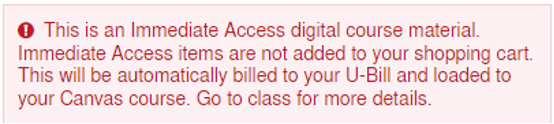
Immediate Access materials can be purchased directly in Canvas in the Immediate Access tab.
Immediate Access materials and purchased eBook are different. For eBooks that you purchased you should have recieved an email from ubsorder@mail.iastate.edu with instructions on how to access your eBook. If you don't see the email please check your spam/junk folder. These materials are NOT accessible in Canvas.
You will continue to work with the Student Accessibility Services (SAS). If you have questions about accessibility and using digital content or need an academic accommodation, please contact the SAS for assistance.
If you are listed in the "Student" role in Canvas, then you will have access to the Immediate Access course materials and will be charged. If you wish to audit a course and not pay for the materials, your professor will need to list you as an "Instructor" or "TA" in Canvas.
If you have a question that was not included in the FAQ, please contact us at immediateaccess@iastate.edu
Just email your title(s) to immediateaccess@iastate.edu. It's best if you can provide Author, Title, and ISBN of the printed book. We will research to find out if it's available from the publisher as an Immediate Access title. If your local publisher rep knows what title(s) you generally use, they may also check to see if it can be enrolled.
- Summer Deadline: April 15
- Fall Deadline: April 15
- Winter Session Deadline: November 15
- Spring Deadline: December 1
- All enrolled students will have access to their required digital material the first day of class
- It is charged to their U-Bill, therefore having access to their financial aid
- Increase learning outcomes for the students. Many of the publisher courseware products use adaptive learning tasks to make sure the student understand material before moving onto the next material. Also, some eBooks have a feature called "CoachMe" that comes at no extra charge. The students use the "Doer Effect" help retain information they learned from answer questions in chapters that are embedded alongside the ebook content.
When you are creating your Canvas shell the Immediate Access link will already be checked. Do not remove this!
Please visit this page to learn how to set up the Immediate Access link.
Once you have the link on your Canvas course don't be alarmed if after you click on it and see "0 Materials" or "You currently have no materials associated with this course". This is normal if you set it up early prior to the start of the term. The digital content is not linked to your Canvas course until two to three weeks before classes start.
CAUTION: If you make any changes to your Canvas page like merging sections or renaming the course shell after Immediate Access materials have been linked the link will break. Please email immediateaccess@iastate.edu immediately.
Immediate Access materials are usually ready to view on the student's Canvas page a week before classes start. This requires that the Immediate Access link is set up on your Canvas course and that we have your five digit Canvas course ID matched to the eBook on the bookstore side. About two weeks before class the CELT team provides VitalSource and the bookstore with each Canvas course's 5 digit ID so we can link your Immediate Access title to your course.
You will know it's ready when after you click on the link, you will see a course card that has an oval field in the center of the course card noting "Immediate Access" on it (circled in red in the example below).
CAUTION: If you make any changes to your Canvas page like merging sections or renaming the course shell after Immediate Access materials have been linked the link will break. Please email immediateaccess@iastate.edu immediately.
The link serves two purposes. First, to allow your students to access their Immedaite Access material. The second is the link provides students with the option to opt-out and purchase the material in Canvas. If the link is not there they cannot opt-out and then would not be able to receive a refund.
Here is a suggested insert for your syllabus. Please note that some courses you are teaching may fall into Immediate Access, while other courses are just using IMMEDIATE ACCESS ONE.
You can publish the course whenever you are ready. Most instructors create their Canvas page and make sure all links are working corrent then make the page live for students to view.
We do suggest making the Canvas Course live at least a week or two before the start of classes so students can view their required course materials.
Immediate Access is only available for required materials with a digital match. We define required as, a material that without access students will not be able to complete graded homework assignments and will struggle to succeed in the course. If you have an optional title that you would like to be in the Immediate Access program, please send us an email.
Students can opt-out of any of their Immediate Access materials within the first 10 days of class and receive a refund (5 days for courses 8 weeks or shorter). If they opt-out, the student is responsible for finding access to their required materials by other means.
Students who drop the course within the first 10 days of class would receive a refund (5 days for courses 8 weeks or shorter) on their U-Bill. This is an automated process, so students do not need to inform the ISU Book Store when they drop.
If your question isn't covered here, you need help, or want to learn more about the Immediate Access ONE program, please contact us at immediateaccess@iastate.edu.